I thought Win 11 desktop always update silently since I have never seen any messages to prompt updates. I just checked and my build number is 7257. The latest is 7301. So should I install v7301 over v7257 or I have to uninstall V7257 before installing v7301?
Hi @jason.lim,
You do not uninstall first. Just exit odrive, download and run the installer. It will perform an in-place update.
Thanks for clarifying that, Tony. Just to double-check, does the in-place update keep all sync settings and linked accounts intact, or is there anything we need to reconfigure after updating?
Hi @michaeelphillips,
All settings and links are kept.
Personally, I’m not a fan of programs not notifying me or asking for permission and instead automatically updating themselves behind my back, which is what my odrive desktop client just did.
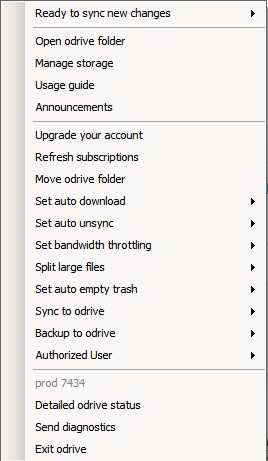
I don’t see a “settings” option from the context menu of the tray icon, so how can I change odrive’s “check for updates” behavior please?
Hi @hmdb ,
There isn’t a way to disabled autoupdates, but you can stop it from auto-restarting when an update is available by setting an advanced configuration setting.